Mock system design case study
Amazon
Designing cart reminder notifications.
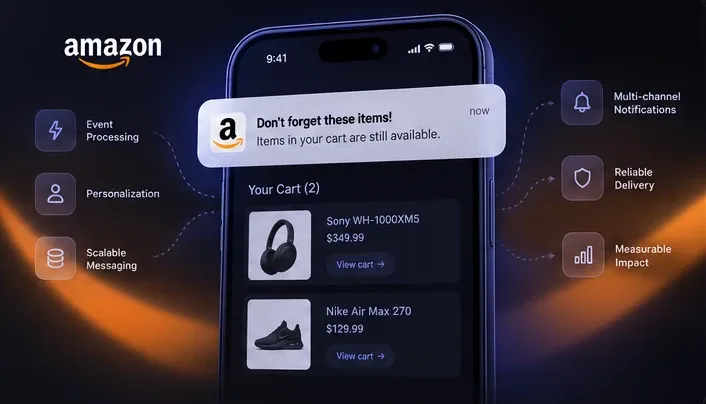
A mock high-level design mapping how cart state, user preferences, queue-based delivery and tracking could work together.
- data stores
- 4
- delivery channels
- 3
- message queue
- 1
- cart monitoring
- Periodic
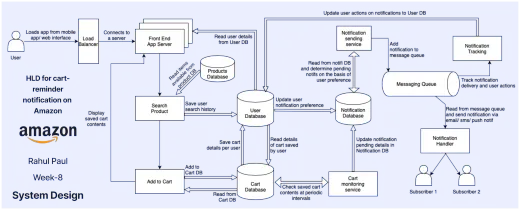
The exercise was a high-level architecture for cart-reminder notifications on Amazon.
- Cart stateSaved carts are read periodically to find reminders.
- User preferencesPending notifications are determined from user notification preference.
- DeliveryNotifications go through a message queue to email, SMS and push.
- TrackingDelivery and user actions are tracked and written back to user state.
This grouping is a way of reading the diagram, not a claim about team ownership.
Experience & ingress
Takes requests from the mobile app or web interface and routes them to a front-end server.
- User
- Load Balancer
- Front End App Server
Product & cart
Reads products, saves items to the cart and displays saved cart contents.
- Search Product
- Add to Cart
- Products Database
- Cart Database
User state
Holds user details, search history, cart details per user and notification preferences.
- User Database
Notification orchestration
Checks saved carts periodically, records pending notifications and decides which to send based on user preference.
- Cart monitoring service
- Notification Database
- Notification sending service
Delivery
Queues notifications, then sends them by email, SMS or push notification.
- Messaging Queue
- Notification Handler
- Subscribers
Tracking
Tracks delivery and user actions and writes the actions back to the User Database.
- Notification Tracking
A native reconstruction of the original diagram. Each component lists its connections using the diagram's own labels; groups run roughly in the order a cart reminder travels.
Experience & ingress
Where a user enters the system.
- UserClient
Uses a mobile app or web interface.
- →Load BalancerLoads app from mobile app / web interface
- Load BalancerGateway
- →Front End App ServerConnects to a server
- Front End App ServerService
Drawn as several server instances.
- →Search Product
Product & cart
Search, add to cart and display saved carts.
- Search ProductService
- →Add to Cart
- →User DatabaseSave user search history
- Add to CartService
- ↔Cart DatabaseAdd to Cart DB / Read from Cart DB
- →Front End App ServerDisplay saved cart contents
- Products DatabaseData store
- →Search ProductRead items available from product DB
- Cart DatabaseData store
- ↔Add to CartAdd to Cart DB / Read from Cart DB
- →User DatabaseSave cart details per user
- ↔Cart monitoring serviceCheck saved cart contents at periodic intervals
User state
User details, search history, saved cart details and preferences.
- User DatabaseData store
- →Front End App ServerRead user details from User DB
- →Cart DatabaseRead details of cart saved by user
- →Notification DatabaseUpdate user notification preference
Notification orchestration
Finds carts to remind about and decides what is pending.
- Cart monitoring serviceService
- ↔Cart DatabaseCheck saved cart contents at periodic intervals
- →Notification DatabaseUpdate notification pending details in Notification DB
- Notification DatabaseData store
- ↔Notification sending serviceRead from Notification DB and determine pending notifications on the basis of user preference
- Notification sending serviceService
- ↔Notification DatabaseRead from Notification DB and determine pending notifications on the basis of user preference
- →Messaging QueueAdd notification to message queue
Delivery & tracking
Queue-based delivery and the feedback path.
- Messaging QueueQueue
- →Notification HandlerRead from message queue and send notification via email / SMS / push notification
- →Notification TrackingTrack notification delivery and user actions
- Notification HandlerConsumer
Delivers by email, SMS or push notification.
- →Subscriber 1
- →Subscriber 2
- Notification TrackingTracking
- →User DatabaseUpdate user actions on notifications to User DB
- Subscriber 1Client
- Subscriber 2Client
Each step is read from the original diagram.
User enters
Loads the app from mobile or web; the request goes through the load balancer to a front-end server.
Load BalancerCart state is created or read
Products are read, search history is saved, and items added to the cart are written to the cart database.
Cart DatabaseCarts are checked periodically
The cart monitoring service checks saved cart contents at periodic intervals.
Cart monitoring servicePending state is recorded
Pending notification details are updated in the notification database, alongside user notification preferences.
Notification DatabaseNotification is queued
The sending service determines pending notifications from user preference and adds them to the message queue.
Messaging QueueNotification is sent
The handler reads from the queue and sends via email, SMS or push notification.
Notification HandlerTracking captures outcomes
Notification tracking follows delivery and user actions.
Notification TrackingUser state is updated
User actions on notifications are written back to the User Database.
User Database
The HLD does not state why it was drawn this way. The original diagram is shown first. These are separated into what it shows and what I read into its structure.
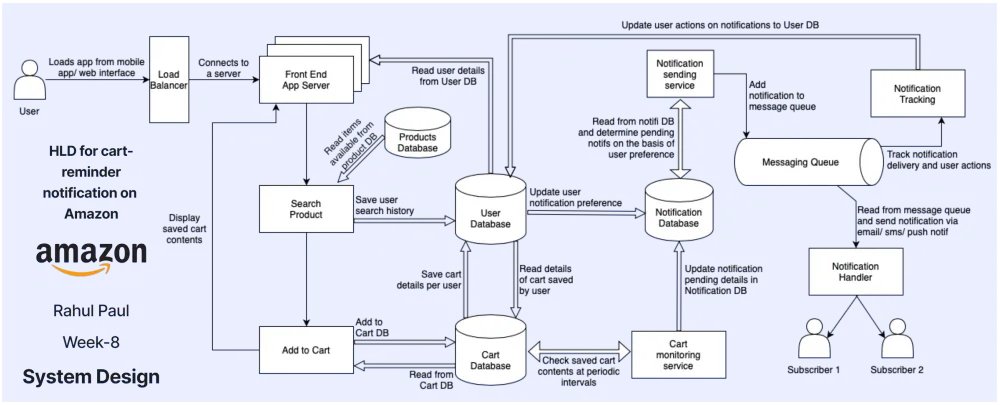
Shown in the HLD
Separate data stores
Products, users, carts and notifications each have their own database.
Periodic cart monitoring
A cart monitoring service checks saved carts at intervals and records pending notifications.
A message queue before delivery
The notification sending service adds notifications to a message queue; a separate handler reads from it.
Multi-channel delivery
The handler sends by email, SMS or push notification.
Separate notification tracking
Tracking follows delivery and user actions, and user actions are written back to the User Database.
Architecture interpretation
The queue separates generation from handling
Placing the queue between the sending service and the handler lets the two evolve and run independently.
Eligibility is out of the request path
Because monitoring runs periodically in its own service, reminder eligibility is not computed while a user is browsing.
Stores isolate state domains
Splitting user, cart, product and notification data keeps each domain's state separate.
Tracking closes the loop
Writing user actions back to the User Database gives the notification path a feedback signal.
Original artifacts1
The original diagram this page is read from, unedited.
High-level design
Cart reminder HLD